
购物车

购物车空

继续购物
总计 $0.00
结算
首页 / News

MLB The Show 26 PCI Sensitivity Recommended Settings

作者: U4N
发布日期: Mar 16, 2026
529

In MLB The Show 26, the newly introduced PCI Sensitivity slider allows you to scale how fast or slow your Plate Coverage Indicator (PCI) moves when using the "Zone" hitting interface.

How Plate Coverage Indicator (PCI) Works

The slider adjusts the relationship between your analog stick movement and the PCI's speed on screen:
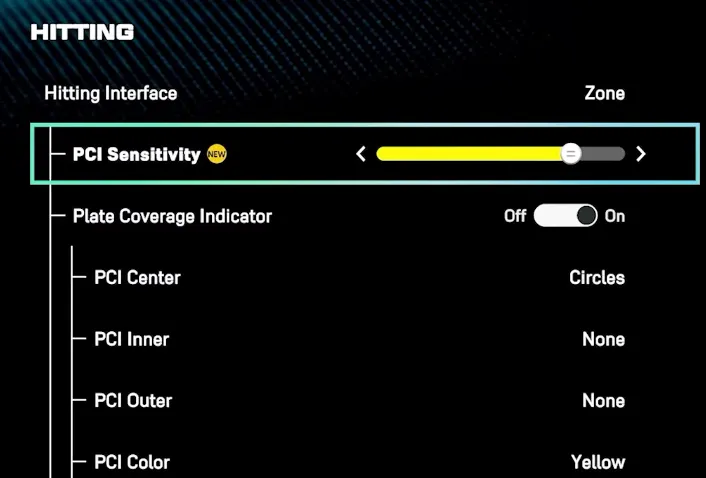
MLB The Show 26 PCI
  • High Sensitivity: The PCI "snaps" across the zone, allowing for faster reactions to high-velocity fastballs and inside heaters.
  • Low Sensitivity: The PCI moves more slowly and deliberately, which helps prevent overshooting the ball but may feel like "input lag" against elite velocity.

Recommended PCI Settings

While the "best" setting is a matter of personal preference, current community and expert recommendations include:

  • For Competitive Players: Many top players recommend starting at Maximum (100%) to ensure you can reach every part of the zone quickly.
  • For Better Control: If you find yourself consistently "slamming" the PCI past the ball, try lowering the sensitivity to 60%–75% for smoother, more precise tracking.
  • Finding Your Feel: A common strategy is to start at the default setting and adjust by one or two notches at a time until the movement feels natural to your thumb's muscle memory.

Related Hitting Settings:

  • Hitting Interface: Zone.
  • PCI Anchor: Off (for more freedom) or preset to a specific zone if you struggle with certain pitch locations.
  • PCI Style: Bat or Diamonds (common "meta" choices).

In MLB The Show 26, finding the right balance with the PCI Sensitivity slider is key to refining your hitting performance. Whether you prefer a more responsive PCI for fastballs or a slower, more controlled feel for breaking pitches, adjusting this setting can give you the precision you need to excel. If you're looking to enhance your experience and get ahead in the game, you might want to buy cheap MLB 26 stubs PS5 from trusted platforms like U4N. With their competitive prices and reliable delivery, U4N offers an easy way to boost your gameplay without breaking the bank.

How to Change PCI

You can find this slider by navigating through the following menus:

  1. Settings
  2. Gameplay (or Controls)
  3. Batting
  4. Scroll down to PCI Sensitivity under the Zone interface section.

Note: You must have your Hitting Interface set to Zone for this setting to be active.

上一个 下一个

作者简介:U4N

U4N是一家领先的在线交易平台,提供安全快捷的游戏内物品、货币、账号和代练服务交易。U4N涵盖众多热门游戏,为玩家提供可靠的服务,包括快速发货和认证卖家,确保流畅安全的游玩体验。

相关文章